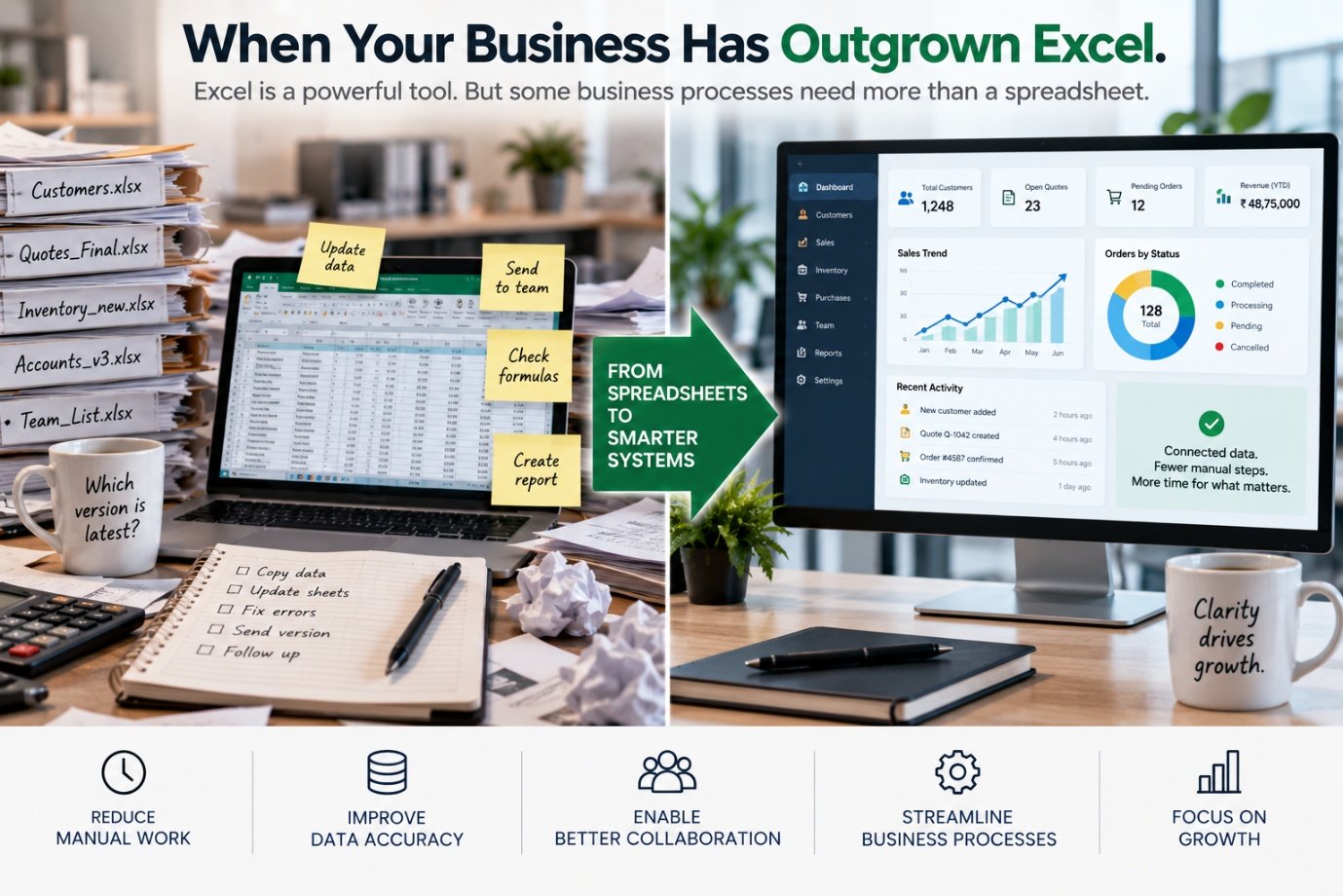
Almost every business uses spreadsheets. And for good reason — spreadsheets are flexible, familiar, inexpensive and remarkably powerful. They can calculate costs, analyse data, create forecasts, manage lists, prepare reports and help teams make decisions.
For a small business, a well-designed spreadsheet can sometimes be exactly the right tool. The problem begins when the spreadsheet quietly becomes something it was never designed to be. It becomes:
And eventually, someone says:
"Don't touch that column. The whole system will break."
That is often the moment when a business should start asking whether it has outgrown Excel.
Excel Isn't the Enemy
It is worth making this clear from the beginning. Excel is an extremely useful business tool. There are many situations where a spreadsheet is appropriate:
The problem isn't using Excel. The problem is using a spreadsheet as the foundation of a process that has become too complex, too important or too large to manage safely that way.
- "Should our business stop using Excel?"The wrong question
- "Which processes should still be managed in Excel?"The better question
How a Simple Spreadsheet Becomes a Business System
It often starts innocently. A business needs to track customers. Someone creates Customers.xlsx. Then another sheet is added for quotations. Then another for payments. Then another for follow-ups. Then someone adds formulas. Another employee creates a copy. Someone sends the file by email. Another person downloads it. Now there are several versions. A manager asks for a report. Someone creates another spreadsheet.
Over time, the original file has evolved from a simple list into a critical business process. But it was never actually designed as a business system. It simply grew organically. This happens more often than businesses realise.
The Five Warning Signs
There are some clear signs that a business process may have outgrown spreadsheets.
1. Multiple People Need to Edit the Same Data
If several employees need to update the same information simultaneously, spreadsheets can become increasingly difficult to manage. Questions start appearing: who has the latest version, who changed this number, why is my data different from yours, did someone overwrite the formula, which file should we use? The more people involved, the more important centralised data management becomes.
2. The Spreadsheet Has Become Too Important
Ask a simple question: what happens if the spreadsheet disappears tomorrow? If the answer is "we would lose critical business information," the organisation may have a data-management problem. Business-critical data needs appropriate:
The exact requirements depend on the business and the sensitivity of the information. But critical information deserves critical protection.
3. Employees Keep Copying and Pasting
This is one of the strongest warning signs:
When employees spend significant amounts of time transferring information between systems, the business may have an integration problem. The employee has effectively become the connection between applications. That is expensive and error-prone.
4. Nobody Wants to Change the Spreadsheet
A surprisingly common situation is "don't change anything — we don't know what the formulas are doing." A spreadsheet can become so complicated that only one person understands it. That creates a form of operational dependency. What happens when that person:
A business process shouldn't depend entirely on someone's memory of how a spreadsheet works.
5. The Spreadsheet Is Doing Things It Was Never Meant to Do
This is perhaps the clearest sign. If the spreadsheet is handling:
it may be time to consider whether a proper business application would provide a better foundation.
The Hidden Cost of Spreadsheet-Based Processes
The biggest problem with spreadsheets isn't usually the software licence. It's the human effort surrounding the spreadsheet — the same operational drag we explored in The Hidden Cost of Manual Business Processes. Consider a weekly report. An employee might:
From one system.
From a second system.
Bring everything into one place.
Remove inconsistencies and duplicates.
Make it presentable.
Verify nothing has broken.
Confirm the numbers add up.
Turn numbers into a visual.
Distribute it to stakeholders.
Explain the numbers, again.
The business may describe this as "we have an Excel report." But what it actually has is a manual reporting workflow. And that workflow may consume hours every week.
Errors Are More Expensive Than They Look
Imagine a spreadsheet contains 5,000 records. Someone accidentally sorts one column without selecting the others. The data becomes misaligned. Or a formula is overwritten. Or a row is deleted. Or someone changes a value without documenting it. Or an old version is used for a management report. The resulting problem may not be discovered immediately.
This is what makes spreadsheet errors particularly dangerous. The spreadsheet may look perfectly normal. But the underlying information may no longer be reliable.
Version Control Can Become a Nightmare
Businesses often end up with a familiar chain of files:
This is funny until the spreadsheet contains critical business information. A centralised application can provide a single source of truth. Instead of asking "which file is current?" employees can work with "what is the current record?" That is a fundamental difference.
The Single Source of Truth
A business becomes much easier to manage when important information has a defined source of truth:
- Customer InformationCRM / Database
- InventoryInventory System
- OrdersOrder-Management System
- Financial TransactionsAccounting System
- EmployeesHR System
- RecipesRecipe Management System
The spreadsheet doesn't necessarily disappear. It becomes an analytical tool rather than the operational database. That is a healthier role for Excel.
Excel Is Often the Symptom, Not the Problem
Sometimes businesses try to eliminate Excel without fixing the underlying process. They purchase new software. But employees still export everything to Excel. Why? Because the software doesn't match the actual workflow. Or it doesn't provide the required analysis. Or different systems aren't integrated. Or employees need flexibility that the application doesn't provide. So the spreadsheet returns.
This is why simply replacing Excel isn't digital transformation — a principle explored further in Digital Transformation Isn't About Buying More Software. The business needs to understand why Excel became necessary in the first place.
Start With the Process
Before replacing a spreadsheet, map the process around it. Ask:
- Where does the information originate — is it entered manually, does it come from another application, or from emails or documents?
- Who uses it — one person, a department, or the entire organisation?
- How often is it updated — daily, hourly or weekly?
- What decisions depend on it — operational, financial or customer decisions?
- What happens after the spreadsheet is updated — does another person receive it, does another system need the information, does a report get created, does someone approve something?
- What happens when the data is wrong — can the error be detected quickly, or does it remain hidden?
These questions reveal whether the spreadsheet is simply a tool — or whether it has become the backbone of a business process.
Not Every Spreadsheet Needs to Become Software
This is equally important. Businesses shouldn't spend money turning every spreadsheet into a custom application. If a finance manager has a spreadsheet for analysing a specific scenario, there may be no reason to replace it. If a small team maintains a simple list of 50 items, a spreadsheet may be perfectly adequate.
- "Convert every spreadsheet into software."The wrong objective
- "Use the right tool for the job."The right objective
A spreadsheet may be the right tool. A database may be the right tool. Existing software may be the right tool. An integrated system may be the right tool. Custom software may be the right tool. The answer depends on the process.
When a Database Makes More Sense
A database is designed to manage structured information more systematically. It can provide capabilities such as:
For example, imagine a business managing 50,000 customer records. Instead of having multiple employees editing a massive spreadsheet, the organisation could use a database-backed application, running on infrastructure built the way we describe in How to Build a Reliable IT Network for a Growing Business:
The spreadsheet can still be used when someone needs to analyse or export information.
When Existing Software Is Enough
Sometimes the answer isn't custom development. A business may already own software capable of handling the process. The problem may simply be that:
Before building something new, businesses should understand what they already have. Technology strategy should avoid unnecessary duplication.
When Integration Is the Better Answer
Imagine a business already has:
The problem is that employees manually move information between them. The business may not need a new replacement platform — it may need integration. For example:
The systems remain in place. But information flows between them automatically. This can often create more value than replacing everything.
When Custom Software Makes Sense
There are situations where a business genuinely has a unique process. Perhaps it has:
In those situations, custom software may make sense. But custom software shouldn't be the first answer — as we explore in Custom Software vs Off-the-Shelf Software: What Should Your Business Choose?, the first question should still be: "what problem are we solving?"
The Recipe Example
The food industry provides a useful illustration. A hotel might maintain recipes in Excel — one sheet for ingredients, another for nutritional calculations, another for costing, another for allergens, another for carbon calculations. Now imagine a chef changes one ingredient. Someone updates the recipe. Someone else updates the nutrition. Another person changes the costing. Another checks allergens. Another recalculates carbon. The organisation has a lot of data. But it isn't connected.
A structured recipe system can instead make the recipe the central data object, exactly as described in What Happens When Recipes Become Data?:
One underlying dataset can support multiple outputs — the same principle behind Nutrition Analysis Is Only Valuable When It Becomes Actionable Data. This is a perfect example of when moving beyond spreadsheets can create value.
The CCTV Example
The same principle applies to surveillance. A business might maintain an Excel spreadsheet containing:
For a small installation, that might be perfectly reasonable. But imagine managing thousands of cameras across multiple locations. Now the business may need:
At that scale, a structured asset-management or surveillance-management system may make more sense. Again, the issue isn't that Excel is bad. The issue is that the operational requirement has grown beyond what a spreadsheet is designed to manage comfortably.
The Point at Which a Business Should Act
There is no magic number of rows at which a spreadsheet suddenly becomes inappropriate. The more useful question is: how critical and complex is the process?
A 500-row spreadsheet containing a simple analysis may be completely fine.
A 100-row spreadsheet controlling a critical financial workflow may already be a problem.
Factors to consider include:
The decision should be based on risk and complexity, not simply spreadsheet size.
A Practical Spreadsheet Audit
If your business relies heavily on Excel, take your most important spreadsheets and ask:
- What does this spreadsheet actually do?
- Who owns it?
- How many people use it?
- How often is it updated?
- Where does its data come from?
- Where does its data go?
- How many manual steps are involved?
- How many formulas are critical to the process?
- What happens if the file is corrupted?
- What happens if the person who maintains it leaves?
- Does another system already contain some of this information?
- Does the business expect this process to grow?
You may discover that some spreadsheets are perfectly fine. Others may clearly be candidates for improvement.
The Transition Doesn't Have to Happen Overnight
Moving away from spreadsheet-dependent processes doesn't necessarily mean replacing everything at once. A sensible transition can happen in stages:
Document the existing process.
Standardise the underlying data.
Create a reliable source of truth.
Integrate relevant systems.
Remove repetitive manual steps.
Build dashboards and reports from the central data.
Use AI or advanced analytics where they genuinely provide value.
This approach reduces the risk of trying to transform the entire business in one project.
The Future Isn't "No Excel"
Excel isn't going away. Nor should it. The future is more likely to be:
Each tool has a role. The problem occurs when one tool is forced to perform all of them.
From Spreadsheet to System
The real transformation can be represented simply:
The objective isn't to make the business less flexible. It is to make important information more reliable and accessible while giving employees better tools to work with it.
The TRUIX Perspective
At TRUIX, we don't believe every spreadsheet should be replaced. We believe every business should understand why it depends on its spreadsheets.
Sometimes Excel is exactly the right answer. Sometimes the answer is better configuration of existing software. Sometimes it is a database. Sometimes it is integration. Sometimes it is custom software. Sometimes it is automation. And sometimes the best solution is a combination of all of them — the same systems-first thinking behind Why Businesses Should Stop Buying Software and Start Building Systems.
The important thing is to start with the business process. When a spreadsheet becomes the place where critical business information is stored, transformed, approved, reported and transferred between departments, it may be telling you something: your business has developed a system. It just hasn't formally built one yet.
The next step isn't necessarily to throw away Excel. It is to understand the process that grew around it — and build the technology that the business actually needs. Because the goal isn't to use less Excel.
to hold everything together.
Related Reading
- Digitisation vs Digital Transformation: What's the Difference?
- Why Businesses Don't Need More Software — They Need Better Systems
- Why Your Business Data Is More Valuable Than You Think
- Why Your Business Network Is the Backbone of Digital Transformation
- Why Ingredient Data Is a Strategic Business Asset
- From Spreadsheets to Carbon Intelligence
- AI Agents vs Traditional Automation: What's the Difference?
- Why Restaurants Need More Than a Digital Recipe Book
- The AI Journey: What Businesses Should Automate First
- APIs: The Missing Link Between Your Business Applications
- Scalable IT Infrastructure: Building for Growth Without Overbuilding
- Why Ingredient Data Is a Strategic Business Asset
- Why Businesses Should Stop Buying Software and Start Building Systems
- The Hidden Cost of Manual Business Processes
- Custom Software vs Off-the-Shelf Software: What Should Your Business Choose?
- Digital Transformation Isn't About Buying More Software
- How to Build a Reliable IT Network for a Growing Business
- What Happens When Recipes Become Data?
- Nutrition Analysis Is Only Valuable When It Becomes Actionable Data
- Software Solutions