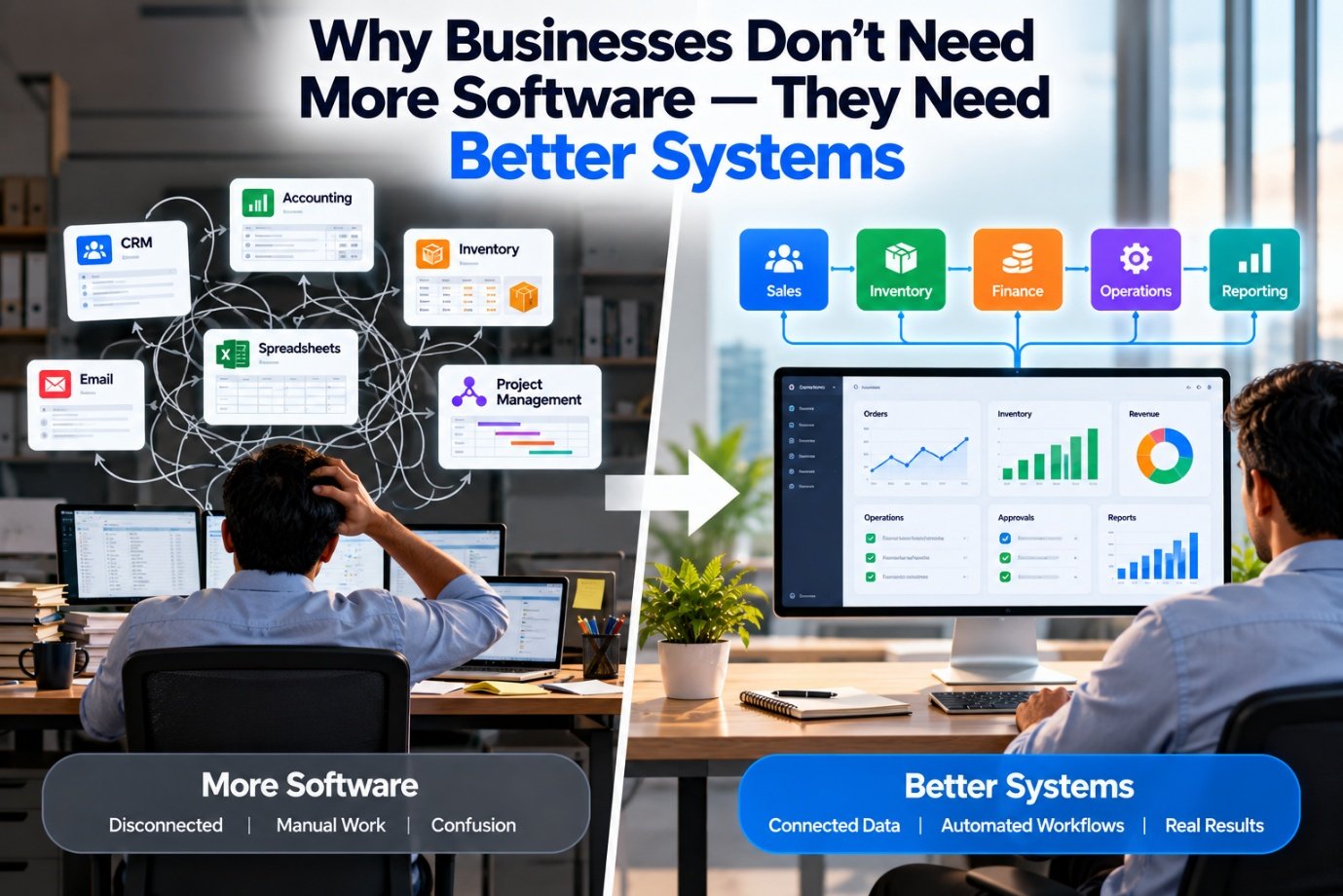
Most businesses have invested in software. Accounting software to manage finances, CRM software to manage customers, inventory software to track stock, project management tools to manage work, and communication platforms to keep teams connected. Some also use ERP systems, HR software, cloud applications, analytics dashboards and AI tools.
Yet many of these businesses still struggle with the same problems they had before investing in technology. Employees enter the same information into multiple systems. Reports don't match. Departments work with different versions of the truth. Approvals are delayed. Manual work continues despite automation tools being available.
And when a new problem appears, the first instinct is often to purchase another application. But what if the problem isn't a lack of software?
What if the real problem is that the business has applications, but no properly connected system of work?
That distinction matters. Software provides capabilities. A system brings together processes, people, data, rules and technology to produce a business outcome. For growing organisations, the second is often far more valuable than simply accumulating the first.
1. The Hidden Cost of Too Many Applications
Imagine a company that uses five different applications:
Individually, each application may perform its job well. But consider what happens when a customer places an order. The sales team records the order in the CRM. Someone checks inventory in another application. Finance verifies payment terms. Operations prepares the order. The warehouse updates stock. Finance eventually creates the invoice.
If these steps are not connected, employees become the integration layer. They copy information, send messages, download reports and follow up with colleagues. The company has digitised several activities, but the overall process remains fragmented—the same gap we describe in Why Businesses Should Stop Buying Software and Start Building Systems. This is one of the biggest mistakes businesses make when adopting technology:
They automate individual tasks without redesigning the process that connects them.
The result is software sprawl—more applications, more subscriptions, more logins and more maintenance, without a proportional improvement in business performance.
2. What Is the Difference Between Software and a Business System?
The distinction is easier to understand with an example.
Software approach: A sales application records an order. An inventory application tracks stock. An accounting application generates an invoice. Employees manually move information between them.
Systems approach: An order triggers a coordinated workflow. Stock is checked, relevant approvals are requested, the order moves to fulfilment, and invoicing follows the appropriate business rules.
The difference is not necessarily the number of applications used. A well-designed system may use several different applications. What matters is whether they work together to support the intended outcome. A business system should define:
Once these elements are clear, technology can support the process rather than dictate it.
3. Start With the Business Problem, Not the Product
Technology purchasing often starts with a product demonstration. A vendor shows an attractive dashboard, an impressive AI feature or a long list of capabilities. The business sees potential and begins evaluating the product. But a better starting point is a simple question:
What business problem are we trying to solve?
For example:
- Sales orders are delayed: Connect order capture, stock availability and fulfilment
- Reports take days to prepare: Standardise data and automate reporting
- Customer enquiries get missed: Connect enquiries, ownership, follow-ups and escalation
- Inventory records are unreliable: Establish a common product database and consistent stock movements
- Approvals take too long: Define approval rules, responsibilities and automated notifications
- Carbon reports require extensive manual work: Connect activity data, emissions factors and calculation workflows
Notice that none of these solutions begins with a particular software brand. The business problem determines the capabilities required. Those capabilities determine the architecture and the tools. This approach also makes it easier to measure whether the investment actually worked. Instead of measuring success by the number of features deployed, the business can measure reduced processing time, fewer errors, faster fulfilment or improved reporting accuracy.
4. Your Data Must Flow Between Applications
A connected system depends on reliable information flow. Consider a customer placing an order. The customer details should not need to be recreated in every application. The order should not need to be manually copied into inventory software. The same product should not have different identifiers across sales, stock and finance.
This is where data integration becomes essential. Applications can exchange information through APIs, connectors, event-driven workflows or other integration methods appropriate to the environment—the same connective role we explore in APIs: The Missing Link Between Your Business Applications. A simplified process might look like this:
This is an illustrative workflow, not a requirement to build a new order management application. Existing applications can often provide these capabilities if they are configured and integrated appropriately. The important point is that information should move according to defined rules, with appropriate validation and error handling. When systems exchange data reliably, employees spend less time transferring information and more time acting on it.
5. Fix the Process Before Automating It
Automation can improve efficiency, but only if the underlying process makes sense. Imagine that a company requires five approvals for a routine purchase. Each approval involves an email, a spreadsheet update and a follow-up message. The company purchases workflow software to automate the process. The software may successfully automate all five approvals. But if three approvals are unnecessary, the business has simply automated unnecessary work.
A better approach is to examine the process first—the same automation-versus-agent distinction we explore in AI Agents vs Traditional Automation: What's the Difference?. Ask:
Only after answering these questions should the process be automated.
The objective is not to automate every existing activity.
It is to design a better way of working and then use technology to support it.
This is particularly important when introducing AI. Intelligent automation is most useful when the process, permissions, data and escalation rules are clearly defined.
6. Good Systems Need Clear Data Ownership
Disconnected applications often create a deeper problem: nobody knows which record is authoritative. The customer name in the CRM differs from the accounting record. The inventory system uses a different product code. A spreadsheet contains a revised supplier price that has not been updated elsewhere. Employees then spend time deciding which version is correct—the same asset-level thinking we describe in Why Your Business Data Is More Valuable Than You Think.
A connected system needs clear data ownership. For example:
These ownership decisions depend on the business architecture. There is no universal rule that one application must own every data category. What matters is that the business defines authoritative sources and controls how updates are shared. Good data governance also includes permissions, validation, audit trails and procedures for correcting errors. Without these foundations, connecting applications can spread inconsistent information faster rather than solve the problem.
7. Why AI Makes Systems Thinking More Important
AI has made it easier to introduce capabilities such as document extraction, conversational interfaces, forecasting and intelligent workflow assistance. But AI does not eliminate the need for well-designed business systems. In fact, it can make that need more important—the same prioritisation we describe in The AI Journey: What Businesses Should Automate First.
An AI assistant asked to answer "Which customers have overdue payments?" needs access to the relevant financial records, a consistent definition of overdue, appropriate permissions and a reliable way to retrieve the information. If the underlying data is scattered or inconsistent, the AI may produce an incomplete or misleading answer. Recent reporting on enterprise AI deployment has similarly highlighted fragmented legacy systems and inconsistent data as obstacles to scaling AI beyond pilot projects.
A systems-based approach establishes the foundation:
Bring the data together rather than leaving it scattered.
Establish who owns what, and how it should be used.
Apply permissions consistently across the system.
Apply AI deliberately, not everywhere at once.
Keep people in the loop where it matters.
AI then becomes part of a functioning business process rather than another isolated tool.
8. One Example: Building a Connected Recipe Management System
Food and hospitality provide a particularly clear example of the difference between software and systems. A business might already use a digital recipe book. It stores ingredients, quantities and preparation instructions. That is useful, but the opportunity extends much further. A connected recipe system can link a recipe to:
Consider what happens when the purchase price of an ingredient changes. A properly designed workflow can identify affected recipes, recalculate costs and flag menu items whose margins may have fallen below a defined threshold. If the ingredient composition changes, the system can also trigger a review of the associated nutrition, allergen and carbon information, according to the relevant calculation and approval rules—the same automated recalculation we describe in How Technology Can Automate Carbon Accounting.
This is much more powerful than maintaining separate recipe, costing and sustainability files. The recipe becomes a connected business data object, and the applications work together around it. The same principle applies to manufacturing, retail, logistics, professional services and other industries.
9. How to Tell Whether Your Business Needs Better Systems
You may not need another application if several of the following statements describe your business—the same tipping point we describe in When Your Business Has Outgrown Excel:
These are often signs of process, data or integration problems rather than a simple shortage of software. The right solution may involve better configuration, cleaner data, integration, process redesign, targeted custom development—or a combination of these. Replacing everything is rarely the only option.
10. A Practical Framework for Building Better Business Systems
Businesses do not need to transform every process at once. A phased approach is often more manageable.
Document how work actually happens, including manual tasks, handoffs, approvals and exceptions.
Look for repeated work, delays, errors, duplicated data or poor visibility.
Set a measurable target, such as reducing processing time or improving accuracy.
Determine what can be configured, integrated or reused before purchasing additional software.
Define common identifiers, units, categories and authoritative records.
Specify how information moves, which rules apply, who is responsible and what happens when something goes wrong.
Start with a manageable scope. Test normal transactions, exceptions, access controls, recovery and reporting.
Compare the outcome against the original baseline. Improve the system based on actual usage and performance.
Extend the approach to other processes only after the first implementation demonstrates value.
This framework keeps the focus on business outcomes rather than technology adoption for its own sake.
11. When Is New Software Actually Necessary?
There are situations where purchasing new software is exactly the right decision. An existing application may lack essential functionality, security controls, scalability or integration capabilities. A business may have a genuinely unique process that generic software cannot support economically. In those cases, new technology can be justified. The decision should consider:
Sometimes the best answer is an off-the-shelf product. Sometimes it is custom software. Sometimes it is an integration layer connecting existing products. And sometimes it is a process change that requires very little new technology.
The right solution is the one that solves the problem reliably, sustainably and at an appropriate cost.
TRUIX Perspective: Technology Should Work as One System
At TRUIX Technologies LLP, we believe businesses should not have to keep adding software simply because their operations have become more complicated. The starting point should be understanding how the business works, what information it uses, where processes break down and what outcomes matter.
From there, technology can be designed around the actual requirement. That may mean custom software, APIs, infrastructure improvements, networking, CCTV integration, automation or better data management—the same growth-aligned design we describe in Scalable IT Infrastructure: Building for Growth Without Overbuilding and Digital Transformation Isn't About Buying More Software. For hospitality businesses, it may also involve connecting recipe management with costing, nutrition analysis and carbon footprint analysis.
Different businesses need different solutions. But the underlying principle remains consistent:
Technology should work together to support the business, not force the business to work around disconnected technology.
A well-designed system does not necessarily mean one giant application. It means the right combination of processes, data, applications, infrastructure and controls, working together with a clear purpose. That is how technology becomes a business capability rather than an ongoing collection of IT expenses.
Final Thought
Buying software is relatively easy. Designing a business system that consistently produces the right outcome takes more thought. It requires an understanding of processes, data, people, integration, security and the practical realities of daily operations.
Businesses that take this broader view can often get more value from their existing technology, identify where new investment is genuinely needed and build a stronger foundation for automation and AI. The goal is not to own more applications. The goal is to run a better business.
Measure the outcome.
Related Reading
- Digitisation vs Digital Transformation: What's the Difference?
- Why Businesses Should Stop Buying Software and Start Building Systems
- Digital Transformation Isn't About Buying More Software
- APIs: The Missing Link Between Your Business Applications
- When Your Business Has Outgrown Excel
- Why Your Business Data Is More Valuable Than You Think
- Scalable IT Infrastructure: Building for Growth Without Overbuilding
- The AI Journey: What Businesses Should Automate First
- AI Agents vs Traditional Automation: What's the Difference?
- How Technology Can Automate Carbon Accounting
- Software Solutions